Friday, 17 June 2011

LG Optimus 3D Officially Announced


                                       Offers 3D vision without glasses


LG has grabbed attention of tech enthusiasts with its latest addition to the popular Optimus series of smartphones. The recently launched Optimus 2X can do nothing but weep at having lost its flagship status. The Optimus 3D is now the latest and greatest offering from the Korean company.


According to the press release, the device boasts of a Tri-Dual configuration: dual-core, dual-channel, and dual-memory, that is. Of course, the most important aspect of the phone is its ability to deliver 3D stereoscopic content without the need for glasses. The display has a real-estate of 4.3", capable of 1080p output in 2D and up to 720p in 3D. The phone's software offers real-time conversion of 2D photos and videos into 3D. The phone is DLNA certified, and an HDMI port is also present. Although the press release doesn't give many details about the CPU and RAM, it is expected to be a dual-core 1 GHz ARM Cortex A9 processor, coupled with a PowerVR SGX540 GPU. The phone will also have a 3D augmented reality browser, developed in collaboration with Wikitude.

Looking at the hype surrounding 3D, this device will probably get a good response. Although the Galaxy S II from another Korean manufacturer packs in more power, the 3D gimmick may prove to be the decisive factor.

The Optimus 3D will be available in Europe first, and then in more than 60 markets around the world over the next several weeks.

Cartier Calibre Astrotourbillon Watch


Over the last few years my interest and respect for Cartier has really grown. Sure, a lot of their timepieces are mass produced, but they have a penchant for good, lasting design. No doubt I am not a fan of all of their watches, but little escapes from their manufacture without being really good for at least some people. Good design - as I am learning more and more - is not easy. Designing something to look outstanding and really cool for 5 minutes is really not that hard. Executing a design that looks god each time you look at it, for years, isn't so easy. In this department, Cartier has succeeded for a long time. I find myself wondering what their secret is............


Interestingly enough, watches with "good" designs don't affect you right away. You might look at them a bit ambiguously at first. Then, after paying attention to them for a while, the quality of the design grows on you. I have never looked at a Cartier watch once and been like, "Winner!" It takes me a while to appreciate them. Sure enough, though, I have grown to really respect almost each timepiece by Cartier from a design perspective.


Now there are the new super high-end manufacture watches from Cartier. Haute Horology now gets Cartier worthy designs. While these super high-end pieces are not all keepers, there are enough outstanding ones. My favorite from last year was the Cartier Rotonde Astrotourbillon watch. The mechanism placed the escapement on a hand that functioned as the seconds hand. The dial has a special "trench" that gave space for the astrotourbillon complication.
For 2011 Cartier will use the same Astrotourbillon movement and put it in a Calibre case. The Cartier Calibre was released last year as their newest men's watch collection. This year, I suspect the Calibre collection will see new models (such as a Chronograph) and this astrotourbillon version is one of them. This is the same Cartier MC 9451 manually wound movement as in the Rotonde version.


The watch case will be 47mm wide in titanium, water resistant to 100 meters, and with a sapphire crystal. Note the large blue sapphire cabochon in the crown. The design of the dial has been done in a very intricate manner as to sustain the look of the basic Calibre dial as well as incorporate the astrotourbillon complication. A stunning piece that, for me, is even more desirable than the original Rotonde Astrotourbillon. The Calibre Astrotourbillon will be limited to just 100 pieces and will be very expensive.

Review: Kobo eReader Touch Edition


Short version: Superficially similar to the new Nook, but the Kobo is perhaps even simpler, and the form factor is slightly more book-like. If you don’t need 3G or the other perks of the Kindle ecosystem, and just want a straightforward e-book reading device, this Kobo could be a good match.

Features:
  • 6-inch touchscreen Pearl E Ink display
  • 2GB (~1.5GB accessible) internal space
  • MicroSD cards slot
  • Supports ePub and PDF (and unofficially CBZ, CBR, rtf, HTML, and txt)
  • MSRP: $129.99
Pros:
  • Extremely simple operation
  • Design and quilted back make it a comfortable device to hold
  • Touchscreen elements quick to respond (i.e. keyboard, sliders)
Cons:
  • Not really a better reading experience than other devices (though not a worse)
  • No 3G option
  • Lacks the bells and whistles of Amazon’s Kindle services


It’s easier to show the functions of the Kobo than describe them, so watch this brief video of a few normal uses of the device to get a feel for how it responds to touch.

In addition to what’s shown in the video, there’s unofficial support for some image and archive files, and somehow I managed not to show the Library — but it’s what you expect.


The question here isn’t really what does the Kobo do, but what does the Kobo do differently? In many ways it is nearly identical to the Nook, at least to the end user. Same screen, same speed, same page caching, etc. It has fewer buttons (just the one home button and a sleep/wake switch) and of course accesses a different store, but the actual e-reading experience will be mostly the same.
The UI is similar to the previous Kobo, which is to say clean and unassuming. Navigating by touch improves it, I think, and the Pearl screen does what it does, equally as well as the other devices that have it. Navigation is now achieved by touching the page numbers at the bottom of books or PDFs, which then brings up your scrub bar, font options, and so on.
You have access to the Kobo e-book store, which has plenty of titles — most of the big bestsellers and tons of free books. You can also drag and drop your own ePub, text, or PDF files onto the MicroSD card and it’ll find them, including if they’re organized in folders. PDFs are easy to zoom in on and scroll around, though their scanned text doesn’t fare so well on e-paper screens.


The question here isn’t really what does the Kobo do, but what does the Kobo do differently? In many ways it is nearly identical to the Nook, at least to the end user. Same screen, same speed, same page caching, etc. It has fewer buttons (just the one home button and a sleep/wake switch) and of course accesses a different store, but the actual e-reading experience will be mostly the same.
The UI is similar to the previous Kobo, which is to say clean and unassuming. Navigating by touch improves it, I think, and the Pearl screen does what it does, equally as well as the other devices that have it. Navigation is now achieved by touching the page numbers at the bottom of books or PDFs, which then brings up your scrub bar, font options, and so on.
You have access to the Kobo e-book store, which has plenty of titles — most of the big bestsellers and tons of free books. You can also drag and drop your own ePub, text, or PDF files onto the MicroSD card and it’ll find them, including if they’re organized in folders. PDFs are easy to zoom in on and scroll around, though their scanned text doesn’t fare so well on e-paper screens.


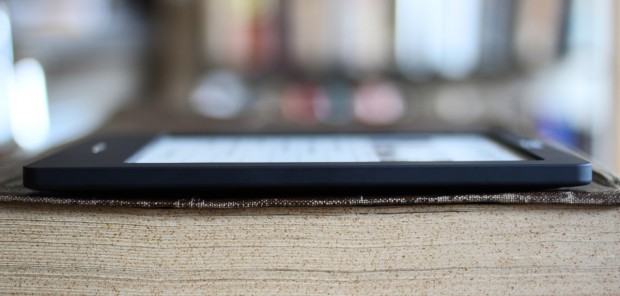
The device itself is light and comfortable to hold, the lovely Kobo trademark quilted back being soft and inviting as always. It really has been reduced to just a screen and a button, there’s very little to say but that it’s nice. Personally I like how it looks better than the Nook and the Kindle both. It also comes in several finishes, though the black is probably the most tasteful.
Conclusion
It’s a close race, but if you’re just going to be using this device for plain old reading, the Kobo is in my opinion the best bet right now. If you’re interested in social recommendations, 3G, apps, or any of the other bonus features found on the Nook and Kindle, it’s best to go with one of those, obviously, but the totally uncluttered and ultra-simple operation of the Kobo eReader Touch Edition makes it a perfectly good choice for an e-reading novice or purist.

Thursday, 16 June 2011

Lenovo tablets likely to be released in July

The release will be followed by a tablet for enterprises later


President and Chief Operating Officer Rory Read said in an interview with Dow Jones Newswires that Lenovo plans a world-wide release of a tablet for consumers early in the summer, likely July, followed by a tablet for enterprises later in the summer, likely August.


The Chinese computer maker, one of the world's fastest-growing PC makers last year, became a global PC player after buying that business from International Business Machines Corp. (IBM) in 2005. Lenovo since has expanded into smartphones with theLePhone--which means "Happy Phone" in Chinese--and its LePad touchscreen tablet, both of which are sold in China and use the Android operating system.

Dell Venue Review | new dell product | dell production | full properties | full display


Attractive but outdated.

Attractive design; Solid build; Gorgeous display; Good camera; Powerful loudspeaker; Convenient Silent mode switch.

Last generation hardware and software; Power button inconveniently placed; 720p video is an interpolated mess; No DivX/Xvid playback; No HDMI-out; No video call camera; Dell Stage is sluggish; Low volume in headphones; Camera lens gets easily covered with


Expert Review


Dell Venue
MRP: Rs 29,990
Street Price: ~ Rs 22,499


While talking about high-end Android phones, we often tend to miss out on the Dell Venue. Although the phone has been in the market for a while now, it has failed to create a stir in a way that phones from Samsung or HTC manage to do. I think it may have something to do with the high launch price. However, now that the price has stabilized, it deserves to be taken a look at.


Bundle
  • Dell Venue
  • Battery
  • Charger
  • USB
  • cable
  • Stereo headset
  • 16 GB microSD card

Design And Build If you have only seen the Venue in photographs, you will know that it is an attractive looking device. In reality, it appears even better. It sports a premium look and feel to it, which goes beyond whatever I've seen from either Samsung as well as HTC. The metal sides feel good to hold and although the phone is a bit heavy, it's not excessively so. The weight and build quality give the feeling of a solid device that is worth the price tag.


On the right side, you will find the volume control button and camera shutter button. On the opposite side is a convenient Silent mode switch like the one on the iPhone. On the top is a 3.5 mm headphone jack and on its right is a power button. Right-handed users may find the latter's location inconvenient. It's also pretty small and hard to press. On Androids, it also works as the lock switch, so you have to press it regularly. This ends up being bothersome. On the bottom are located the loudspeaker grille, microphone, and micro-USB port.


On the back, you will find an 8 megapixel camera lens and single LED flash. The former is positioned such that you often end up covering it with your finger while shooting. Below the battery cover is a microSD card slot; thankfully, you don't have to remove the battery.

Display
The Venue has an awesome 4.1" AMOLED display. It has pixel dimensions of 800x480, which gives it a pixel density of roughly 227 ppi, which is quite decent. The quality of the display is very good, with rich colours and excellent contrast. Compared to a Galaxy S, the Venue's display is slightly better. The blacks were really black, but not completely black as in the case of other AMOLED displays. You can make out that they are a bit lighter, while the display's border looks darker in comparison. Furthermore, the daylight visibility isn't that great.


The display is covered by Corning's Gorilla Glass, which makes it scratch resistant. Unfortunately, the glass is curved, due to which the viewing angle isn't as good as it could have been. After a certain angle, the curvature of the glass distorts the picture. If you have one of those old CRT displays lying around, you'll know what I mean. In this case, it's actually a bit worse, since there is a slight gap between the display and the curved glass.

The phone has three keys below the display, and for some reason, they have a layout that is neither logical nor common. If you have used other Android phones, you will find that these buttons take some getting used to.

Hardware And Software
The Venue runs on the very first generation Qualcomm Snapdragon QSD8250 SoC with a 1 GHz Scorpion CPU and an Adreno 200 GPU. The phone has 512 MB of RAM, 1 GB of ROM, and ships with a 16 GB memory card. These days, most phones in its class come with at least an MSM8255. Although the hardware does work fine today, a few months down the line, it might struggle when apps with higher requirements hit the market.


Just like the hardware, the Venue runs on the outdated Android 2.2. Dell has made no promises about a future Gingerbread update, but it can't be completely ruled out. Like the Dell Streak, the Venue comes with Dell's Stage UI that puts a bunch of widgets on the screen and a different side-scrolling application drawer. The widgets aren't particularly interesting, while the app drawer runs at an inexplicably low framerate that makes the sliding animation look choppy. I preferred to replace the whole thing with LauncherPro. The Stage UI is the extent of customization that Dell has performed on the Venue. The rest is pretty much stock Android, which I personally prefer.

The phone performed well in our tests . It was pretty fast and I didn't come across any bugs - apart from the weather app that kept crashing in the background even though I didn't use it.


Connectivity And MultimediaThe Venue is a quad-band GSM 3G handset. It supports HSPA, EDGE, GPRS, Bluetooth, Wi-Fi, and A-GPS connectivity. The call quality and network reception were good, and voices on either side were distinctly heard. Bluetooth, Wi-Fi, and A-GPS too worked well.

The device has an 8 megapixel camera with autofocus and an LED flash. The image quality of the camera is pretty decent. Daylight images exhibit decent details, although the low-light performance could have been better. Unfortunately, the video recording quality was terrible. I don't know whether it was the test handset or a general problem with the model, but the supposedly 720p recorded video actually looked like an SD video interpolated to look big (and ugly). Lower resolution videos had no issues though.


The music player supports all major formats except for FLAC, which is found in competing Samsung smartphones. It's the same default Android player with basic functionality. The audio quality through the headphones was pretty good, although the volume was quite low. However, with adequate volume levels, the Loudspeaker quality was decent.

The image gallery on the Venue is the default Android 2.2 gallery. Therefore, it resizes images when you view them, but the display quality is so good that you don't really mind it.

The video player is pretty mediocre as well. It lacks support for popular codecs such as DivX and Xvid. You can however install an app such as RockPlayer, which can play those for you. We tried playing 720p videos, and as long as they were MP4, the phone managed to play them well. Finally, the large display also makes for a very good video playback experience.


The battery life is on par with most Android phones. Which means it sucks.


The Venue has a 1400 mAh Li-Ion battery, whose life is mediocre and on par with other Android phones. With all theGoogle services active in the background, while making regular calls, messaging, web browsing, music playback, and application usage, I got a battery life of about a day on a full charge; that too on a 2G network.


A few months ago, the Venue was unappealing because of its high price. Today, it is even less appealing, but that's mostly due to the competition. Instead of paying Rs 22,499 for the Venue, I would rather pay a bit more for the LG Optimus 2x that has a dual-core processor and 1080p video recording. Unless Dell decides to drop the price significantly, I suggest you give it a miss.


Performance: 3.5
Design & Build Quality: 4
Features: 4
Value For Money: 3
Mojo: 3.5 

Develop a Facebook app and win iPhone 4

Here's an opportunity to develop exciting apps on Facebook and win an iPhone 4, iPad 2 or iPod Touch


BANGALORE, INDIA: If your passion is coding, then here is a platform that enables you to demonstrate your skill. KRDS, a developer consultant, is organizing a two day 'Developer Contest" for developing apps on Facebook.


According to the release, 'KRDS Face Code' is a two-day developer hackathon, where the top 3 app developers will bag some exciting prizes like the iPhone 4, iPad 2 and iPod Touch.

The online contest begins June 24th, 8 pm and ends on June 26th, midnight. Developers participating in this contest will be challenged with three scenarios, for any of which, they need to develop a Facebook App, added the release.
Announcing the competition, Guillaume Simon, chief technology officer & Co-founder, KRDS said, "Undoubtedly, India has a huge potential in this space, with the increasing reach of web 2.0 and mobile apps, the need for developers is increasing by the hour."

He added, "We at KRDS consider this to be a great platform for all the techies who are stimulated by a challenging and competitive work atmosphere. The exciting prize apart, a chance to showcase one’s capabilities is a motivating factor.”
Developers can register here for the contest and the registrations are open till June 24th, 2011, 8 pm.

Seagate GoFlexAccess iPhone And Android App For Accessing Seagate GoFlex Home Network Server.

Seagate has introduced the GoFlexAccess mobile device app for its GoFlex Home network storage system for Apple devices and Android smartphones. The GoFlexAccess mobile device app is fully compatible with Apple iPad, iPhone, iPod touch devices. The new app allow users to access photos, movies, music and documents from anywhere while on-the-go with network access.


Seagate GoFlexAccess iPhone And Android App features:
  • All of the shares on GoFlex Home, as well as all of the content stored elsewhere on the drive are now available from mobile devices
  • Create slideshows from photos in shares and play music at the same time to accompany it
  • Stream video to mobile devices over 3G/4G and WiFi
  • Access Excel, PowerPoint, Word documents and PDFs, etc.
  • The app features content type filters, to simplify access to your content that may contain a large number of files and file types
  • Album art support for music files
GoFlex Home storage system is available in 1TB, 2TB and 3TB storage capacities and has ability to back up files wirelessly from both Windows and Mac OS X operating systems. For additional storage, the GoFlex Home storage system has USB port to connect additional drives to this USB port.
The GoFlex Home network storage in India:
The GoFlex Home network storage system is now available in India for a suggested retail price of INR 8,000 for 1TB, or INR 12,000 for 2TB.

Enews And Updates